ITIN pay stubs
Create a Pay Stub with an ITIN (No SSN Required)
Generate accurate, professional earning statements using your Individual Taxpayer Identification Number. Preview before you pay.
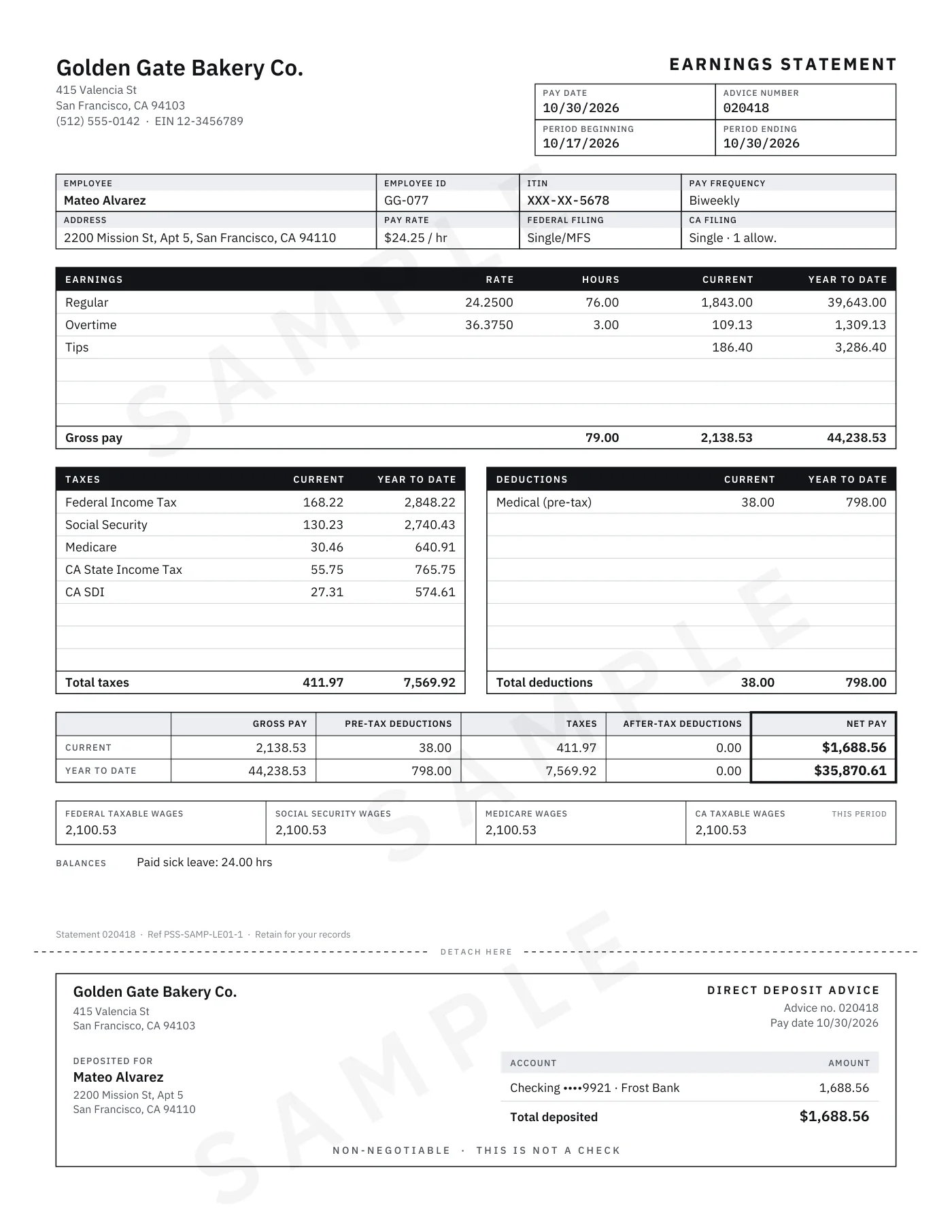
- Prints as ITIN XXX-XX-5678
- Free live preview of every number
- From $6.99, no subscription
Why customers choose it
Labeled ITIN, never SSN
An ITIN is formatted like a Social Security number, so the label matters. Choose ITIN as the taxpayer ID type and your stub names it correctly, right beside the last four digits.
Only four digits print
Type the full number or just the last four. Only the last four digits print, and the full number never leaves your browser. Prefer no ID at all? Choose None.
Calculated, not guessed.
Federal income tax, Social Security and Medicare are calculated for every pay date, plus state tax where supported, with year-to-date totals that add up.
Ready in seconds
One payment, no account or subscription. Download PDF, ZIP and JPEG files right away, with a free detachable direct deposit advice on every stub.
How it works
Enter the details
Choose ITIN as the taxpayer ID type, then add the employer, your pay rate or salary, and your pay dates. We build the pay schedule and do the tax math.
Check every number
The free live preview shows taxes, deductions, year-to-date totals and net pay. Switch between eight templates without re-entering anything.
Pay once and download
Your files are ready in seconds and stay available for 30 days. Purchased documents are final, so make any changes before you pay.
What an ITIN is, and how it shows on your stub
The IRS issues an Individual Taxpayer Identification Number (ITIN) to people who need a U.S. taxpayer identification number for federal tax purposes but aren't eligible for a Social Security number. An ITIN is nine digits, begins with 9 and is formatted like an SSN: NNN-NN-NNNN.
Because the two numbers look alike, a stub should say which one it shows. When you choose ITIN, the ID type prints with the last four digits, for example ITIN XXX-XX-5678, so anyone reading the stub knows exactly what they're looking at. Everything else works like any pay stub we make: earnings, taxes, deductions, net pay and year-to-date totals.
A pay stub doesn't need your full number
A pay stub identifies the employee, but it doesn't have to print a complete ID number. California's wage statement law, for example, calls for the employee's name with only the last four digits of the Social Security number, or an employee identification number other than a Social Security number (Labor Code section 226).
PayStubShop pay stubs follow the same principle. You choose the taxpayer ID type (SSN, ITIN or None), and only the last four digits ever print. You can also add an employee ID, which prints as you enter it.
What's on your ITIN pay stub
Every stub carries the details of a complete earnings statement, calculated from what you enter. All eight of our templates print the same figures, so choose the look you like.
- The employer's name and address, and your name with your taxpayer ID
- The pay period and pay date
- Hours and rates, or salary, with overtime where it applies
- Federal income tax, Social Security and Medicare, plus state tax where supported
- Deductions, net pay and year-to-date totals for each line
- A detachable direct deposit advice, free with every stub
Accurate figures, start to finish
Enter your real pay and the stub does the rest. Federal income tax withholding follows the IRS Publication 15-T percentage method for the Form W-4 choices you enter. In states we don't calculate, you enter the state and local amounts from your payroll records, and a missing tax is never printed as $0.
Stubs for a rental or loan application should match the records they'll be read alongside, such as your bank deposits. Our guides to pay stubs for rental applications and pay stubs for loan applications cover what landlords and lenders typically ask for, and how to read a pay stub walks through every line.
Paid as a contractor? Use the contractor layout
If you're paid as an independent contractor rather than through payroll, a contractor payment statement is the better fit. Choose the Contractor Statement template and the document shows the services, the amount paid, any backup withholding and the year-to-date total, with no employee tax lines. ITIN works there too, and so does EIN.
At year end, the business that paid you may send you a Form 1099-NEC. Our page on 1099-NEC and 1099-MISC with an ITIN shows how an ITIN appears on those forms, and W-2 vs. 1099 explains how employees and contractors differ.
| Taxpayer ID type | What prints |
|---|---|
| ITIN | ITIN XXX-XX-5678 |
| SSN | SSN XXX-XX-5678 |
| None | No taxpayer ID number |
| Employee ID (optional, in addition) | Printed as you enter it |
Questions, answered
Can I make a pay stub without a Social Security number?
Yes. Choose ITIN as the taxpayer ID type and the stub shows ITIN with the last four digits, for example ITIN XXX-XX-5678. You can also choose None to print no taxpayer ID. Calculations, templates and downloads work exactly the same way.
Do I have to enter my full ITIN?
No. Type all nine digits or just the last four. Either way, only the last four digits leave your browser and print on the stub.
Is my information secure?
Documents print only the last four digits of any taxpayer ID. Document details are encrypted at rest, files stay private behind links that expire, and files are deleted 30 days after purchase. We never sell data.
Which template should I choose?
Any of the eight. Classic Payroll is our most popular, and every template prints the same calculated figures. If you're paid as a contractor, choose Contractor Statement. You can switch freely in the preview before you pay.
How much does an ITIN pay stub cost?
The same as any stub. One is $6.99, with a free direct deposit advice, and each additional stub in the same order costs less. It is a one-time payment, with no account or subscription.
Does PayStubShop send anything to the IRS?
No. PayStubShop doesn't file anything with the IRS or the SSA. Your documents are generated from the details you enter, and you're responsible for their accuracy, so check each figure in the free preview.
Can I change my stub after I buy it?
We believe in transparency. You get full access to our live preview before you enter your payment details. Review every number, check the layout, and choose your template. Once purchased, your document is finalized and cannot be edited. If you need a different document, you can easily start a new order.
Sources
- IRS: Individual taxpayer identification number (ITIN)
- IRS: Taxpayer identification numbers (TIN)
- IRS Publication 15-T, Federal Income Tax Withholding Methods
- California Labor Code section 226
- California DIR: Paydays, pay periods, and the final wages
General information, not legal or tax advice.
Create a Pay Stub with an ITIN (No SSN Required)
From $6.99. Preview every number before you pay. No account or subscription.
Create Pay Stub with ITIN